

01 Plugin for Adobe Lightroom Classic
Originals
From virtual copies to your originals. And back.
You have built a collection of virtual copies, added star ratings, color labels, flags and keywords.
Then you need to apply some of those choices to the original images. Where are they? How to select just the corresponding ones?
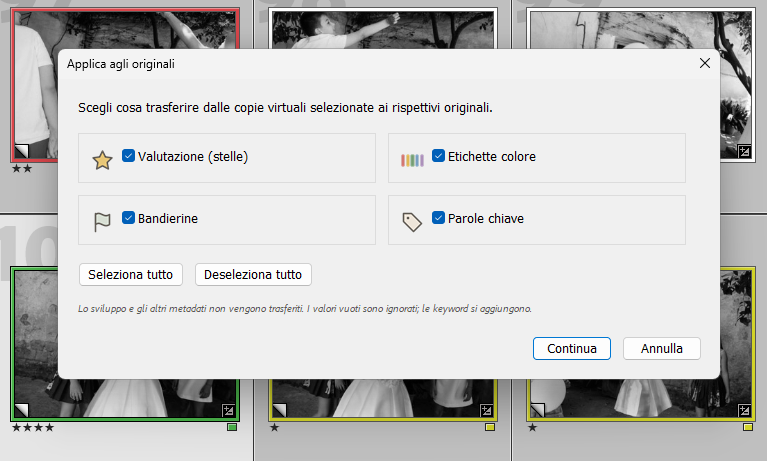
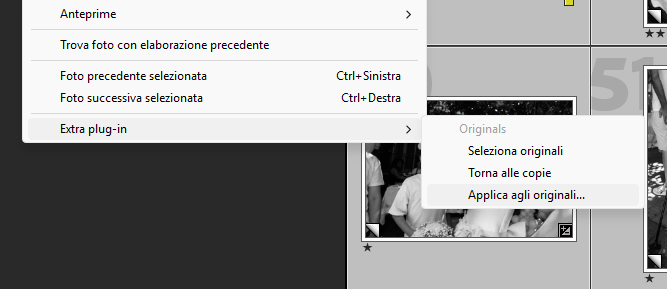
Originals connects these steps. Transfer your choices to the corresponding originals, or simply select the original files to work on them. When you are done, return to the copies and collection you started from.
Your workflow
-
Work on your virtual copies
Build your collection and work on your virtual copies as usual. Add star ratings, color labels, flags and keywords to organize your selection.
-
Transfer your choices to the originals
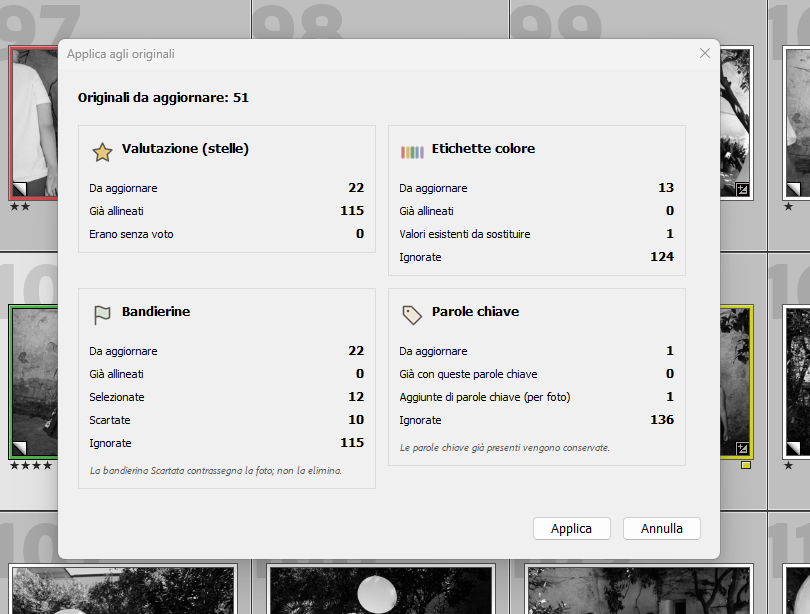
Choose what to transfer in one panel: ratings, color labels, flags or keywords. Review the summary, then apply your choices in one operation.
-
Pick up where you left off
Go back to the exact virtual copies you selected at the start, in the same collection or folder. Your changes to the originals are kept.
How to install
- Download and unzip the archive.
- Move the entire Originals.lrplugin folder to a permanent location on your computer.
- In Lightroom Classic, open File → Plug-in Manager.
- Click Add, select Originals.lrplugin and check that Originals is enabled.
The ZIP includes a full guide in English and Italian, plus the MIT licence.
Adobe’s plugin guideDid it save you some time?
A question or a suggestion about Originals? Get in touch